Writing a company e-signature SOP: authority, verification, personal data, and archiving
An e-signature SOP is an internal rule that answers four questions: who has authority to sign which documents, how signer identity is verified, how personal data in documents is handled, and how final documents are stored. Without an SOP, every staff member uses their own method, and the company only notices the gaps when a contract is disputed.
 Resmi.ID Team · 6 min read ·
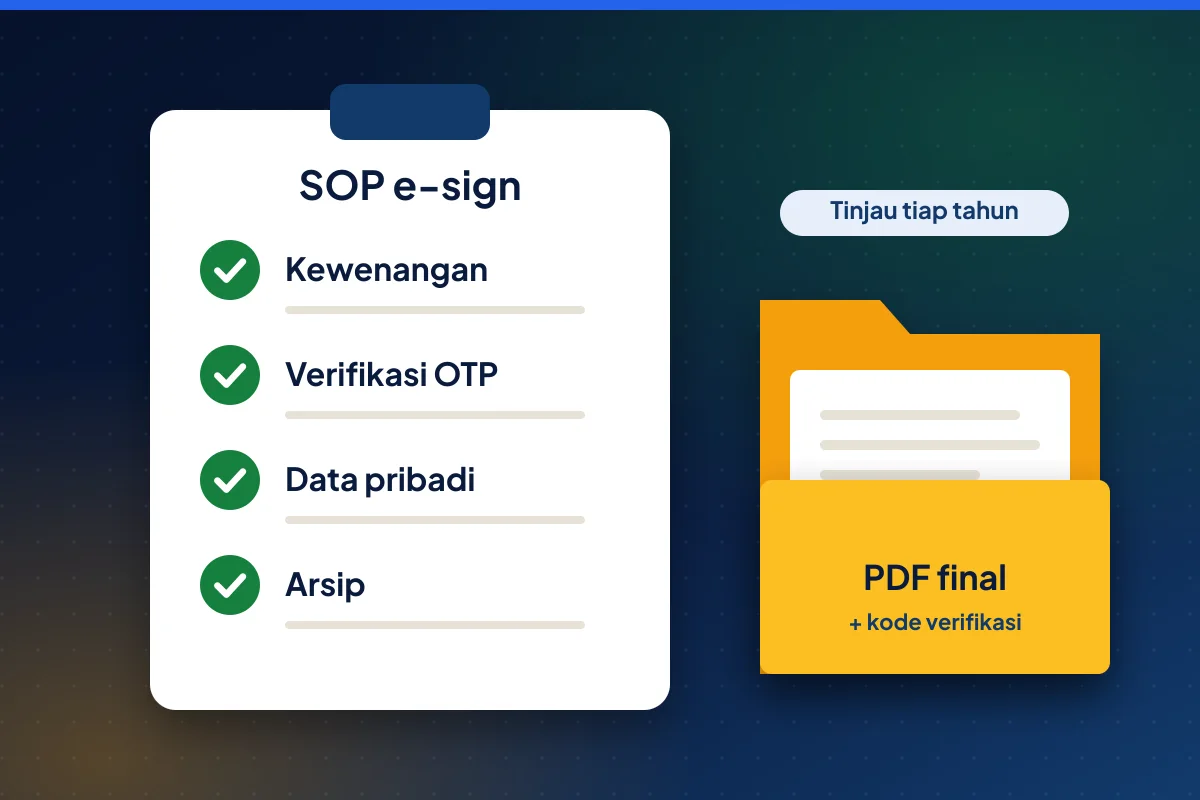
This article provides an SOP framework you can adapt to the size and type of your business. It is general information, not legal advice; for the final policy, involve your legal adviser or data protection officer.
1. Authority: who may sign what
The first question is not technology but authority. For a limited liability company, Article 98 of Law 40/2007 on Limited Liability Companies states that the Board of Directors represents the company in and out of court, subject to limits that may be set by law, the articles of association, or a resolution of the general meeting of shareholders. Article 103 allows the Board of Directors to give written power of attorney to employees or other people to carry out specific legal acts on the company's behalf.
Electronic signatures do not change those authority rules. A staff member who signs a contract without authority is still a problem, however quickly the signature is applied. That is why an SOP should include a clear authority matrix.
- A list of document types and their value limits, such as quotations, supplier contracts, employment contracts, and partnership agreements.
- The officer authorised to sign each type and value limit, and the internal approver before a document reaches an external party.
- The basis of authority, namely the articles of association or a written power of attorney, and its validity period.
- The signature type for each document: uncertified with OTP, certified from a PSrE, or a notarial deed where required.
2. Identity verification and workflow
Article 12 of the EIT Law requires everyone involved in an electronic signature to secure it, including making sure the system cannot be accessed by unauthorised people, and signers must take care that their signature creation data is not used without authorisation. Turn that duty into concrete working rules.
- 1One person, one accountEach sender uses their own Resmi.ID account. Passwords must not be shared.
- 2OTP is mandatoryAll signers are verified with an email or WhatsApp OTP. The no-OTP option is only for documents designated as very low risk.
- 3Personal contactsLinks are sent to the signer's personal email, not a shared address, and external contacts are confirmed first.
- 4Order and rolesInternal approvers are placed before the signing officer in sequential mode, and parties who only need a copy are set as reviewers.
- 5Final means finalDocuments already sent are not edited. Changes are made by cancelling and resending, or by an addendum.
Share these rules with external parties from the start too, for example in a cover email: which address signing invitations will come from, that OTP codes must never be given to anyone, and whom to contact if in doubt. This simple step helps partners tell a genuine invitation from a fake link imitating your company.
3. Personal data in documents
Signed documents contain signers' personal data, and the signing system records evidence such as IP addresses and devices. Article 16(2) of the Personal Data Protection Law (Law 27/2022) requires personal data to be processed in a limited and specific way, in line with its purpose, secured against unauthorised access and disclosure, and destroyed or deleted when the retention period ends unless regulations provide otherwise. Articles 35 to 39 require controllers to protect the security of personal data, keep it confidential, and prevent unauthorised access.
- Minimise data: do not include ID numbers, ID photos, or bank account numbers if the agreement does not need them.
- Limit recipients: invite only the parties who need to sign or receive a copy.
- Share proof, not files: if another party only needs to confirm authenticity, share the verification code, not the full PDF.
- Set a retention period for each document type and appoint someone to review it regularly.
Note that the docs.resmi.id privacy policy states that signed documents and their audit trails are kept permanently as evidence, while documents that have never been sent can be deleted at any time. So the decision to minimise data must be made before a document is sent, not afterwards. The docs.resmi.id public verification page masks signer names, does not show email addresses, and does not include IP addresses or devices.
4. Archiving, monitoring, and incidents
Example: a distribution company appoints a legal staff member as owner of the contract archive. At the end of each month they download the final PDFs, record the verification codes in the contract register, export the audit trail log as CSV, and check documents that have been awaiting signature for more than a week. This one hour a month saves a lot of time during an audit or dispute.
- Keep the final PDF as is, without compressing or re-printing it, so it still matches the hash on the verification page.
- Review the audit trail regularly for anything unusual, such as documents sent outside working hours by a rarely used account.
- Prepare a procedure for a compromised account or email: change the password, notify the parties concerned, and check documents sent during that period. Article 12 of the EIT Law asks signers to promptly notify those who rely on their signature if their data is compromised.
- If an incident involves personal data, follow the notification duties in the PDP Law, including the 3 x 24 hour deadline in Article 46.
Start simple
An SOP does not have to be long. One or two pages containing the authority matrix, verification rules, personal data rules, and archiving rules are far better than nothing. Share it with every staff member who sends documents, then set up the workflow on docs.resmi.id: OTP for every signer, order and roles that match the matrix, and an archive of the final PDF and verification code for every completed document.
References
- JDIH BPK — UU Nomor 40 Tahun 2007 tentang Perseroan Terbatas
- JDIH BPK — UU Nomor 27 Tahun 2022 tentang Pelindungan Data Pribadi
- JDIH BPK — UU Nomor 11 Tahun 2008 tentang Informasi dan Transaksi Elektronik
- JDIH Kemenkeu — PP Nomor 71 Tahun 2019 tentang Penyelenggaraan Sistem dan Transaksi Elektronik
- RSM Indonesia — Client Alert: PP 33/2026, Six Implementation Priorities before 16 January 2027
This information is general and not legal advice. For important decisions, check the latest regulations at official sources or consult a legal professional.